
Golf cart multifunction steering wheel

Golf cart multifunction steering wheel

Multifunctional Steering Wheel for Golf Carts – User Guide

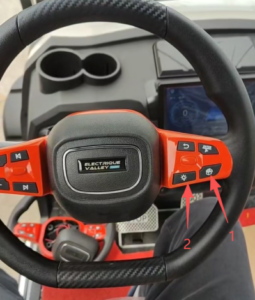
This steering wheel integrates commonly used control functions with clearly arranged buttons for easy blind operation while driving. The specific functions are as follows:

• Previous Track / Next Track: Switch between tracks

• Volume+ / Volume-: Adjust media volume

• Play / Return: Control playback status and menu navigation

• Ambient Light Switch: Turn the interior ambient light on and off

• Storage Compartment Switch: Open the storage compartment

Wireless Pairing Instructions (required only once)

1.Before pairing, make sure all other vehicles in the vicinity are turned off to avoid signal interference and accidental pairing with the wrong device.

2.Press and hold the “Storage Compartment Switch” for 3 seconds, then release.

3.Next, press and hold the “Ambient Light Switch” for 3 seconds. When you hear a single “beep” from the horn, pairing is successful and the steering wheel is ready for normal use.

That covers the entire operation process – simple, practical, and convenient for daily driving.

Related Articles